


[SBS] 排错 Windows Server 2012 Essentials SSTP VPN 0x80092013 故障
![logo_winserver2012_thumb[1]](http://goxia.maytide.net/ftpupfiles/SBS_C647/logo_winserver2012_thumb1.png "logo_winserver2012_thumb[1]")
排错 Windows Server 2012 Essentials SSTP VPN 0x80092013 故障
Windows Server 2012 Essentials 可通过配置向导来启用 VPN 服务,使公司用户能够在外网通过 VPN 接入到内部。当客户端基于 SSTP 协议连接 VPN 时可能会遇到 0x80092013 故障“由于吊销服务器已脱机,吊销功能无法检查吊销。”
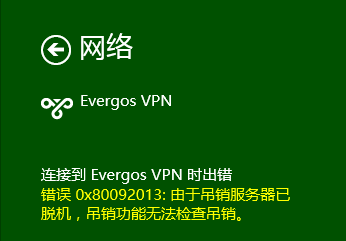
这是证书服务的一种安全机制,类似我们使用 IE 访问一些 HTTPS 网站时也会遇到类似的提示,但是用户可以略过警告,或者通过 IE 的高级配置将其屏蔽。
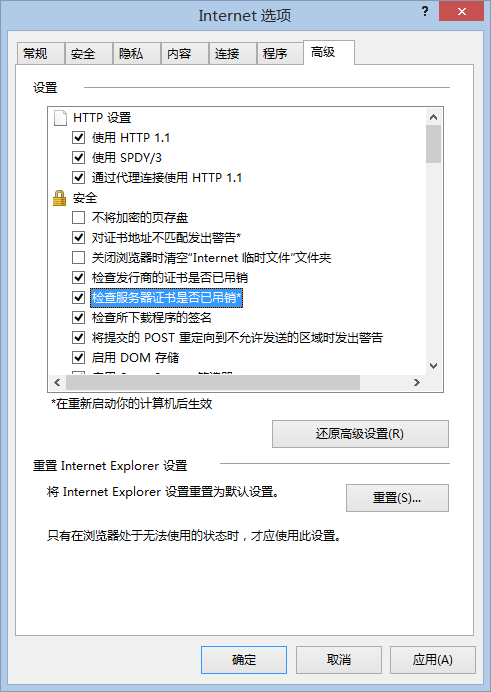
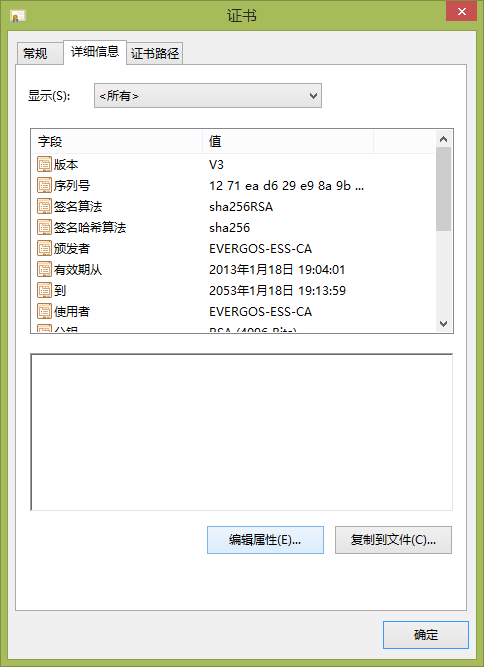
按照这个思路,开始尝试通过禁用证书的 OCSP 检测来解决问题,运行 MMC 并加载证书管理,找到这个根证书进入其属性,切换到详细信息选项卡,并点击“编辑属性”。
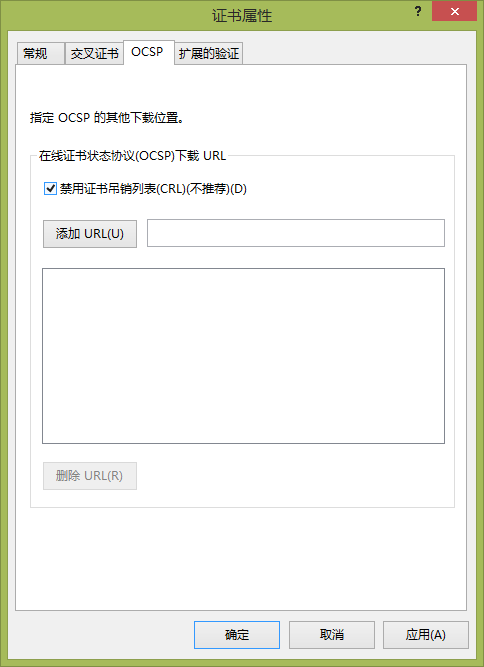
在 OCSP 选项卡中勾选“禁用证书吊销列表”,之后重新连接 VPN 测试,发现无效。也许正如前面提到的是因为安全机制要求 SSTP VPN 必须验证证书吊销。
回到起点分析 0x80092013 故障,因为吊销服务器脱机导致无法获取证书吊销列表(CRL),那就先从访问吊销服务器开始排错。
首先,查看此 CA 办法的证书,可访问 Essentials 的 RWA 站点,可从证书的详细信息中查到 CRL 分发点信息,如下图所示 CRL 分发点是一个 URL 地址,在内网访问该地址是正常的,能够下载 CRL。由于该地址并不是一个完整的 Internet 网址,所以用户无法从外部正常访问,从而未能获得 CRL。
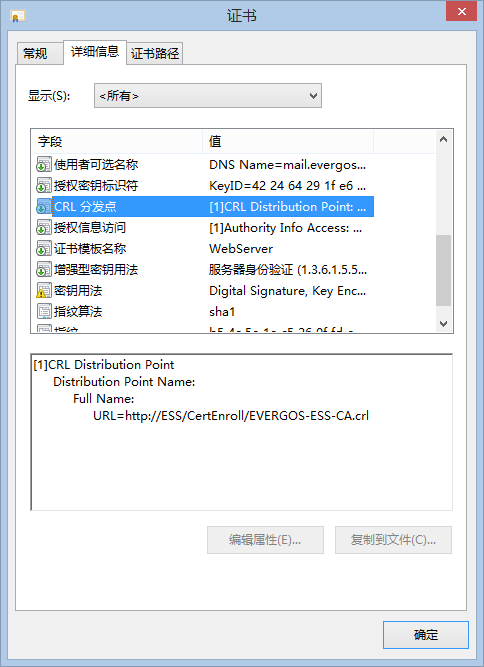
既然如此,只要保证用户在外部能够获取到 CRL 就应该能够解决问题,根据现有 CRL 的 URL 地址,对照 Essentials 的 RWA 结构,该 CRL 外部的访问地址应该类似“http://remote.contoso.com/certenroll/contoso-ess-ca.crl”,果断从外部访问该 URL 成功拿到了 CRL。那么就可以为此根证书指定 CRL 的位置,为此回到前面提到的 OCSP 设置位置,手工添加这个 CRL 外部可访问的 URL 地址,再次测试发现又失败了!
搜索了知识库找到了 KB961880,故障分析结果倒是完全相同,不过官方给出的解决办法是配置证书服务器,在 CA 服务器属性的扩展选项卡中添加新的可供外部访问的 CRL 分发点地址,并确认复选“包括在 CRL 中,客户端使用它来寻找增量 CRL 的位置”,“包含在颁发的证书的 CDP 扩展中”,“包括在已发布的 CRL 的 IDP 扩展中”。如下图所示:
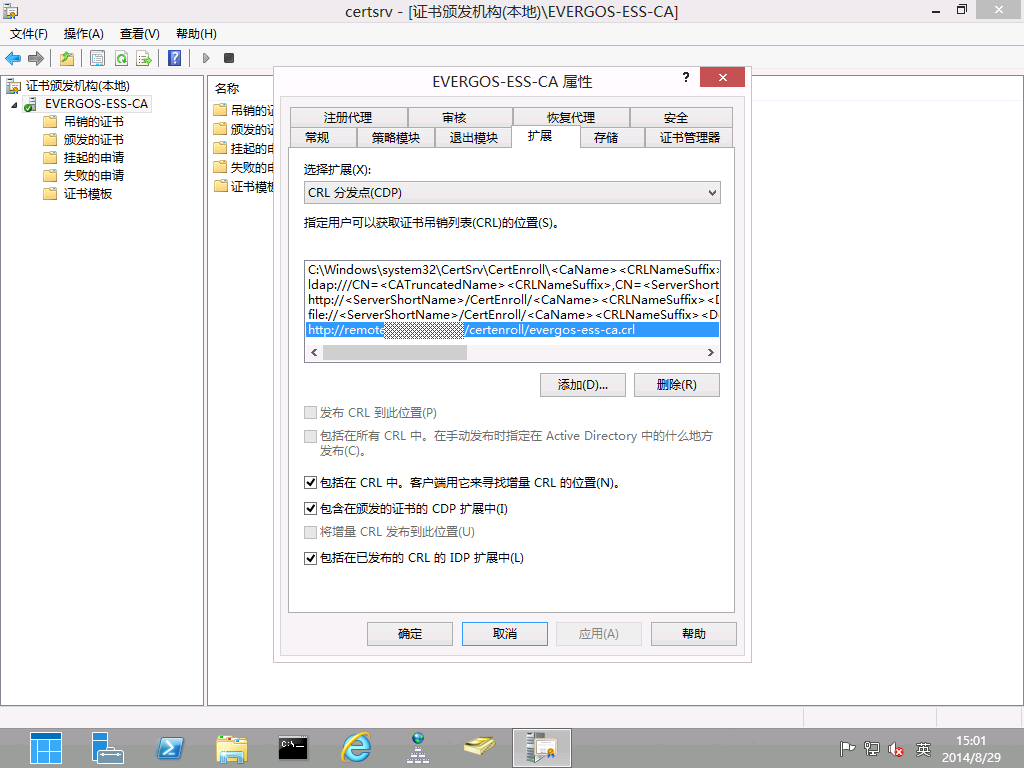
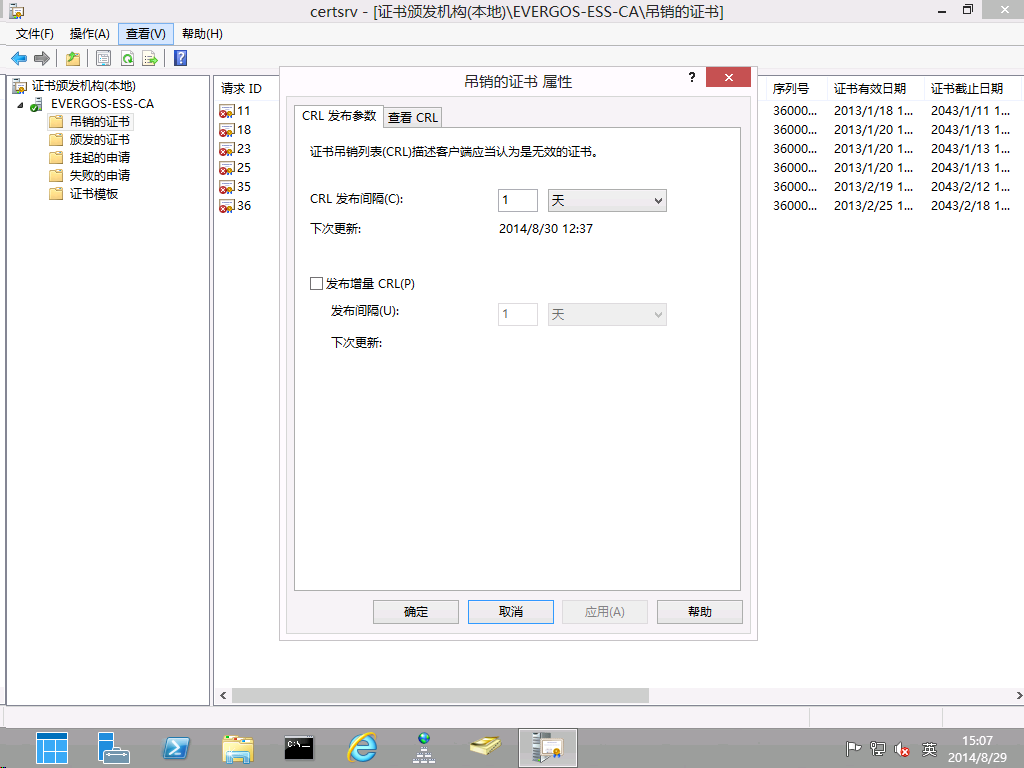
此外,要将之前已存在的基于 HTTP 发布的 CRL 地址复选框都去掉,接下来就是等待,默认是 1 周的时间。当然如果实在等不及,也可以修改“吊销的证书”属性中的 CRL 发布参数,将其改为 1 小时,等生效后再恢复默认设置即可。
现在连接 VPN 已经不会再出现 0x80092013 故障了!
[转载] Top Support Solutions for Windows Server 2012 Essentials and Windows Server 2012 R2 Essentials

Top Support Solutions for Windows Server 2012 Essentials and Windows Server 2012 R2 Essentials
1. Solutions related to Remote Web Access:
- Troubleshooting Common VPN issues on Windows Server 2012 R2 Essentials
- Understanding VPN configuration in Windows Server 2012 R2 Essentials
- What Happens When You Release Your Domain Name from Windows Server 2012 R2 Essentials
- Troubleshooting “An unexpected error occurred” message when using Remote Web Access to connect to computers
- Configuring and Customizing Remote Web Access on Windows Server 2012 R2 Essentials
2. Solutions related to Office 365 integration issues:
3. Solutions related to installation issues:
- You may be unable to run post-deployment configuration wizard after you install the Windows Server Essentials Experience role
- Deploying Windows Server 2012 R2 Standard/Datacenter with Windows Server Essentials Experience role in an Existing Active Directory Environment
- Deploying Windows Server 2012 R2 Essentials in an Existing Active Directory Environment
- Windows Server 2012 R2 Essentials Migration – Keys to Success
- Configuring Microsoft Azure Online Backup on Windows Server 2012 R2 Essentials
- Migrating to Windows Server 2012 Essentials
- Migrate Windows Server 2012 Essentials to New Hardware
- Enabling multiple instances of Windows Server Essentials Experience in your environment
- Hosting Windows Server Essentials Experience in Windows Azure
- Virtualization and Windows Server 2012 R2 Essentials
4. Solutions related to Migrating SBS to a new server or to new servers:
- You may be unable to run post-deployment configuration wizard after you install the Windows Server Essentials Experience role
- Deploying Windows Server 2012 R2 Standard/Datacenter with Windows Server Essentials Experience role in an Existing Active Directory Environment
- Deploying Windows Server 2012 R2 Essentials in an Existing Active Directory Environment
- Installing and Configuring the Windows Server Essentials Experience role
- Windows Server 2012 R2 Essentials Migration – Keys to Success
- Migrating to Windows Server 2012 Essentials
- Migrate Windows Server 2012 Essentials to New Hardware
5. Solutions related to Server activation:
- Understanding Licensing for Windows Server 2012 R2 Essentials and the Windows Server Essentials Experience role
- Using Windows Server 2012 Essentials with more than 25 users
- Upgrade Options for Windows Server 2012 R2
[转载] Top Support Solutions for Windows Server 2008 and Windows Server 2008 R2

Top Support Solutions for Windows Server 2008 and Windows Server 2008 R2
1. Solutions related to bugchecks, stop errors, and unexpected restarts:
- Windows Memory Dump Collector
- Bug Check Code Reference (Windows Debuggers)
- USB devices stop working in Windows 8 or Windows Server 2012
- How to generate a kernel or a complete memory dump file in Windows Server 2008 and Windows Server 2008 R2
- How to use the special pool feature to isolate pool damage
- How to determine the appropriate page file size for 64-bit versions of Windows Server 2008 and or Windows 2008 R2
- Using Driver Verifier to identify issues with Windows drivers for advanced users
- How to diagnose Windows 7 and Windows Server 2008 R2 performance issues
- How to troubleshoot Directory Services PKI and ADCS issues for Windows 7 and Server 2008 R2 using Fix it Center Pro
- Collect memory dump files in Windows 7 and in Windows Server 2008 R2
2. Solutions related to Active Directory issues:
- Upgrade Domain Controllers to Windows Server 2012
- Upgrade Domain Controllers to Windows Server 2008 R2
- Running Adprep.exe
- How to restore deleted user accounts and their group memberships in Active Directory
- Root Causes for Slow Boots and Logons (sbsl)
- “Directory Services cannot start” error message when you start your Windows-based or SBS-based domain controller
- How to remove data in Active Directory after an unsuccessful domain controller demotion
3. Solutions related to Active Directory replication:
- Download Active Directory Replication Status Tool from Official Microsoft Download Center
- Troubleshooting Active Directory Replication Problems: Active Directory
- Replication error 1722 The RPC server is unavailable
- Replication error 8453 Replication access was denied
- Replication error -2146893022 The target principal name is incorrect
- Replication error 1753 There are no more endpoints available from the endpoint mapper
- Replication error 1396 Logon Failure The target account name is incorrect
- Replication error 8614 The Active Directory cannot replicate with this server because the time since the last replication with this server has exceeded the tombstone lifetime
- Replication error 8524 The DSA operation is unable to proceed because of a DNS lookup failure
- Replication error 1256 The remote system is not available
- Replication error 8451 The replication operation encountered a database error
- Troubleshoot Directory Services issues in Windows 7 and in Windows Server 2008 R2
4. Solutions related to DNS:
- Don’t be afraid of DNS Scavenging. Just be patient.
- Optimizing your network to keep your DNS squeaky clean
- The size of the Active Directory increases rapidly on a Windows Server 2003-based or Windows Server 2008 R2-based domain controller that hosts the DNS Server role
- DNS server stops responding to DNS queries from client computers in in Windows Server 2003, in Windows Server 2008 or in Windows Server 2008 R2
- Some DNS name queries are unsuccessful after you deploy a Windows-based DNS server
- A primary DNS zone file may not transfer to the secondary DNS servers in Windows Server 2008
- A DNS Update is recorded as failed: Event ID 5774, 1196, or 1578
5. Solutions related to Active Directory Federation Services (AD FS):
- AD FS 2.0 Troubleshooting Guide
- Active Directory Federation Services (ADFS) Wiki Articles
- AD FS 2.0 Content Map
6. Solutions related to File Replication Technologies (FRS and DFSR):
- Where’s my file? Root cause analysis of FRS and DFSR data deletion
- Understanding DFSR debug logging (Part 14: A sharing violation due to a file locked upstream between two Windows Server 2008)
- Understanding DFSR debug logging (Part 17: Replication failing because of blocked RPC ports (uses debug severity 5))
- Common DFSR Configuration Mistakes and Oversights
- DFSR Event ID 2213 is logged on Windows Server 2008 R2 and Windows Server 2012
- List of currently available hotfixes for Distributed File System (DFS) technologies in Windows Server 2008 and in Windows Server 2008 R2
- The performance of DFS Replication in Windows Server 2008 is slower than expected on a WAN connection, and no error message is logged in the DFS Replication log
7. Solutions related to installing Windows updates or hotfixes:
- You cannot install some updates or programs in Windows XP
- How to address disk space issues that are caused by a large Windows component store (WinSxS) directory
- How does Windows choose which version of a file to install...
- How branching works for installing updates - The Windows ...
- The Windows Servicing Guy - Site Home - TechNet Blogs
- Troubleshoot common installation issues in Windows Update, Microsoft Update, and Windows Server Update Services
- How to read the Windowsupdate.log file
8. Solutions related to system hangs:
- PRF: Perceived System Sluggishness - Ask the Performance ...
- How to diagnose Windows 7 and Windows Server 2008 R2 performance issues
- How to troubleshoot Directory Services PKI and ADCS issues for Windows 7 and Server 2008 R2 using Fix it Center Pro
- Collect memory dump files in Windows 7 and in Windows Server 2008 R2
9. Solutions related to Active Directory Certificate Services:
- Designing and Implementing a PKI: Part III Certificate Templates
- Troubleshooting PKI Problems on Windows
- Having a problem with nodes being removed from active Failover ...
- Active Directory Certificate Services (AD CS) Overview
- Revoking certificates and publishing CRLs: Public Key
- How to add a Subject Alternative Name to a secure LDAP certificate
- How to enable LDAP over SSL with a third-party certification authority
- How to troubleshoot LDAP over SSL connection problems
- Active Directory Certificate Services (AD CS) Public Key Infrastructure (PKI) Frequently Asked Questions (FAQ)
- Troubleshooting Certificate Autoenrollment in Active Directory Certificate Services (AD CS)
10. Solutions related to TCP/IP communications issues:
- DNS Round Robin and Destination IP address selection
- Source IP address selection on a Multi-Homed Windows Computer
- Stop code in the tcpip.sys driver on a computer that is running Windows Server 2008 R2: 0x000000D1
- Windows Server Troubleshooting: "The RPC server is unavailable"


